Menu
CCMEXEC.COM – Enterprise Mobility
  • General
  • Configuration Manager
  • Windows 10
  • Windows 11
  • Intune
  • GitHub
  • About
CCMEXEC.COM – Enterprise Mobility

Finally we can Ignore Windows Update Group Policies

Posted on November 4, 2026November 4, 2026 by Jörgen Nilsson

Moving from Configuration Manager and WSUS to Windows Update for Business should be straightforward. Move the workload. Deploy an Update Ring. Target a Feature Update policy. Sit back and watch Windows install updates from Windows Update instead of WSUS/Configuration Manager.

Except that’s not always what happens. Instead, you find devices that stubbornly refuse to follow Intune policies. Feature Updates never arrive. Windows Update appears healthy, yet something clearly isn’t right. In many of these cases, the culprit isn’t Intune, it’s old Windows Update policies that are still hanging around. We have all written scripts to run as remediation scripts to clear out these registry values to make sure Windows updates are installed from Windows Update.

Microsoft introduced IgnoreWindowsUpdateGroupPolicies specifically to address this problem. The setting is available through the Windows Update Policy CSP and Settings Catalog and allows Windows Update for Business policies delivered through MDM to ignore legacy Windows Update Group Policy settings.

What does this setting do? Well let’s start by looking at an Co-Managed Device where settings are applied using Group Policy and Configuration Manager. Which is as it should be.
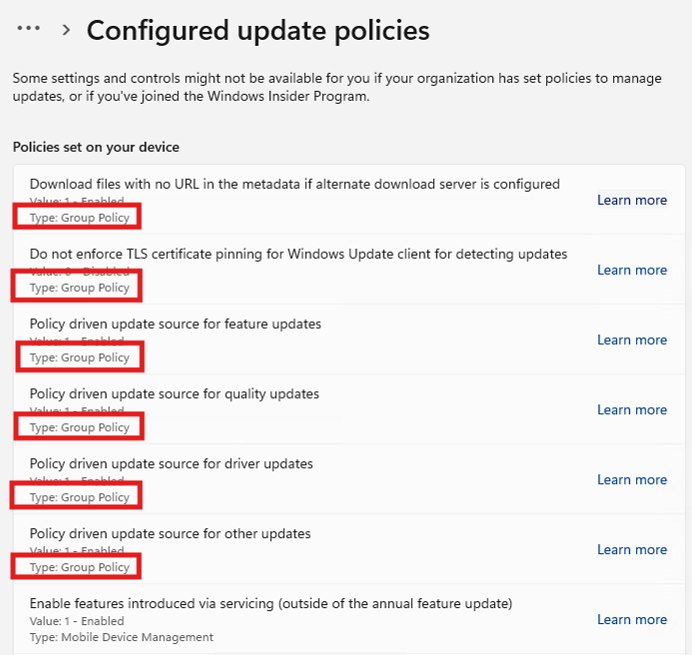
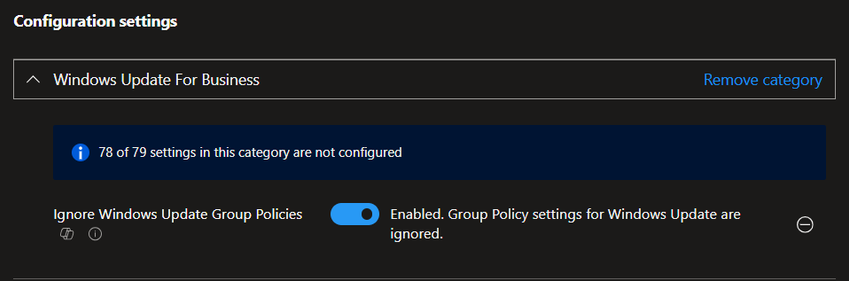
Using the new IgnoreWindowsUpdateGroupPolicies settings

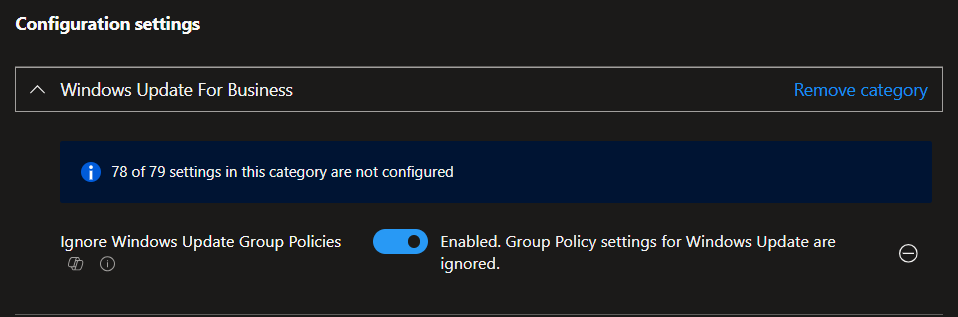
With the new settings we can simply ignore all Group Policy settings for Windows Update or to be more precise all registry values under HKLM\Software\Policies\Microsoft\Windows\WindowsUpdate. We start with configuring the policy in Intune and deploy it to our devices.
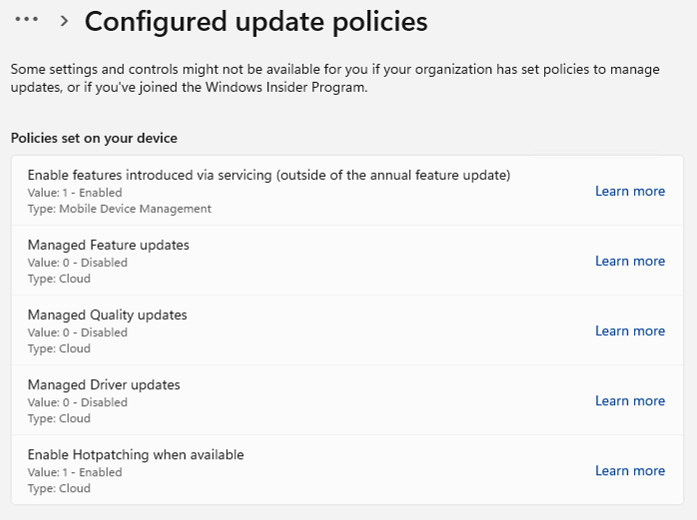
After the policy is applied we now see that no Group Policy based policy is being used anymore by Windows Update even if the registry values are still inplace.
In the Registry all the policies are still inplace but totally ignored.
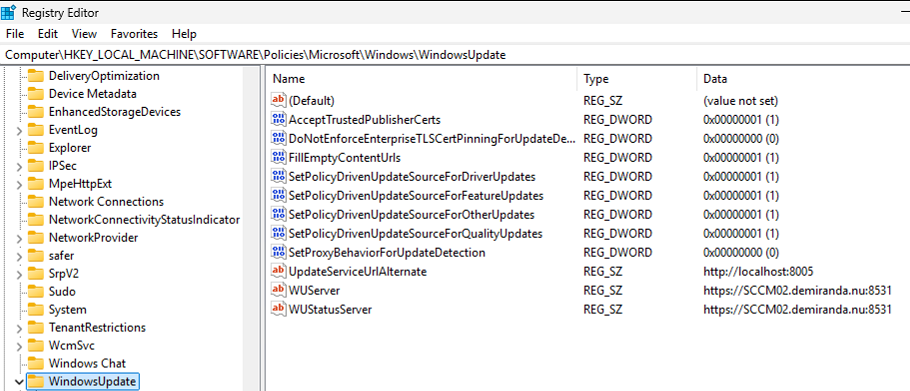
I so wish I had this a couple of years ago it would have saved me much time, troubleshooting and building scripts to clean up the registry values for Windows Update.
Why write a post on this now? Well I plan to deploy this everywhere that we still use Co-management and have moved the workload to Intune. Just to make sure that no group policy is created that interfere with Windows update or the Configuration Manager client start to write this values again that mess up Windows Updates.

Leave a Reply Cancel reply

Your email address will not be published. Required fields are marked *

This site uses Akismet to reduce spam. Learn how your comment data is processed.

My name is Jörgen Nilsson and I work as a Senior Consultant at Onevinn in Malmö, Sweden. This is my blog where I will share tips and stuff for my own and everyone elses use on Enterprise Mobility and Windows related topics.
All code is provided "AS-IS" with no warranties.

Recent Posts

  • Finally we can Ignore Windows Update Group Policies
  • Block SSH using Windows Firewall
  • Windows 365 – Placing a Cloud PC Under Review
  • Edge management service – extension monitoring
  • Microsoft Intune Endpoint Privilege Management – Overview
©2026 CCMEXEC.COM – Enterprise Mobility | WordPress Theme by Superb Themes
This website uses cookies to improve your experience. We'll assume you're ok with this, but you can opt-out if you wish.Accept Reject Read More
Privacy & Cookies Policy

Privacy Overview

This website uses cookies to improve your experience while you navigate through the website. Out of these, the cookies that are categorized as necessary are stored on your browser as they are essential for the working of basic functionalities of the website. We also use third-party cookies that help us analyze and understand how you use this website. These cookies will be stored in your browser only with your consent. You also have the option to opt-out of these cookies. But opting out of some of these cookies may affect your browsing experience.
Necessary
Always Enabled
Necessary cookies are absolutely essential for the website to function properly. This category only includes cookies that ensures basic functionalities and security features of the website. These cookies do not store any personal information.
Non-necessary
Any cookies that may not be particularly necessary for the website to function and is used specifically to collect user personal data via analytics, ads, other embedded contents are termed as non-necessary cookies. It is mandatory to procure user consent prior to running these cookies on your website.
SAVE & ACCEPT