Menu
CCMEXEC.COM – Enterprise Mobility
  • General
  • Configuration Manager
  • Windows 10
  • Windows 11
  • Intune
  • GitHub
  • About
CCMEXEC.COM – Enterprise Mobility

Creating better Driver update groups

Posted on January 27, 2026January 27, 2026 by Jörgen Nilsson

When working with Driver Updates in Intune creating groups with different models are a challenge, which we will look at. But let’s start with having a look at how driver updates in Intune works.
I for one use driver updates as a mean of having an easy way of blocking a Driver update if it causes issues as compared to allowing all driver updates to install automatically.
How often do this happen? Maybe once a year so not a real big deal.

  • Extension drivers, or Sub drivers are not under approval control, these install when they are released and can cause drivers that depends on them to stop working, like audio for example until the device is restarted. The number one discussion topic when customers have questions regarding driver updates and reboots.
  • Recommended drivers, in many cases they solve issue that are not considered critical by the vendor but could be for you as a customer. If not doing it already work with recommended drivers, maybe release them once a month together with the Cumulative update to minimize reboots.

How do we test drivers? Well, here is the challenge even if we use Autopatch groups, there is no check that all driver models are covered, the members are added randomly.

Creating better group for targeting

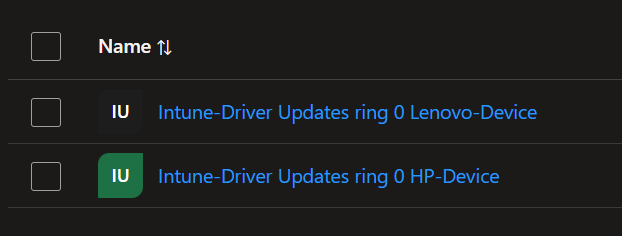
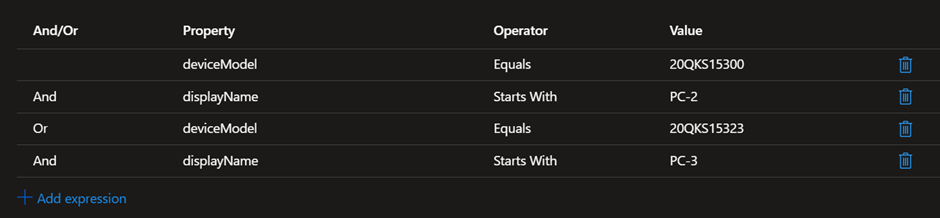
What can we do then? We can create Entra ID dynamic groups that includes driver model and part of the name. Then we get a couple of computers for each model in out test group.

We can user “deviceModel” together with computer name starts with or ends with depending on how the manufacturer set the serial number from left to right or right to left. If working with more than one vendor it could be a good idea to have them in different groups as well to make it easier to see which drivers are from Dell, HP and Lenovo for example.

Some examples:
Dell where I use “Starts With”

Lenovo example:
If you only allow recommended drivers today, I recommend that you start working with approving other drivers as well. Yes, it is little bit of work testing but it is still much easier than updating them any other way.

More reading about driver updates using Intune

Learn about Windows Driver updates policy for Windows devices in Intune – Microsoft Intune | Microsoft Learn

Create Windows Driver updates policy in Intune – Microsoft Intune | Microsoft Learn

Leave a Reply Cancel reply

Your email address will not be published. Required fields are marked *

This site uses Akismet to reduce spam. Learn how your comment data is processed.

My name is Jörgen Nilsson and I work as a Senior Consultant at Onevinn in Malmö, Sweden. This is my blog where I will share tips and stuff for my own and everyone elses use on Enterprise Mobility and Windows related topics.
All code is provided "AS-IS" with no warranties.

Recent Posts

  • Creating better Driver update groups
  • Windows 11 initial Start Menu with Intune
  • Application Control for Business and the story of the unsigned WIX dll’s
  • MMUGSE – Meetup October 24 2026
  • Windows 365 Link – a week and some
©2026 CCMEXEC.COM – Enterprise Mobility | WordPress Theme by Superb Themes
This website uses cookies to improve your experience. We'll assume you're ok with this, but you can opt-out if you wish.Accept Reject Read More
Privacy & Cookies Policy

Privacy Overview

This website uses cookies to improve your experience while you navigate through the website. Out of these, the cookies that are categorized as necessary are stored on your browser as they are essential for the working of basic functionalities of the website. We also use third-party cookies that help us analyze and understand how you use this website. These cookies will be stored in your browser only with your consent. You also have the option to opt-out of these cookies. But opting out of some of these cookies may affect your browsing experience.
Necessary
Always Enabled
Necessary cookies are absolutely essential for the website to function properly. This category only includes cookies that ensures basic functionalities and security features of the website. These cookies do not store any personal information.
Non-necessary
Any cookies that may not be particularly necessary for the website to function and is used specifically to collect user personal data via analytics, ads, other embedded contents are termed as non-necessary cookies. It is mandatory to procure user consent prior to running these cookies on your website.
SAVE & ACCEPT